Sitemap Manager
Upload and manage your sitemaps to proactively prepare pages for crawler requests, increasing your SEO reactivity and reducing on-demand renderings.
Overview
The Sitemap Manager provides a central view of all your submitted sitemaps. By loading your sitemaps into Index Render, our system will fetch and render those pages directly so they are immediately ready for crawlers.
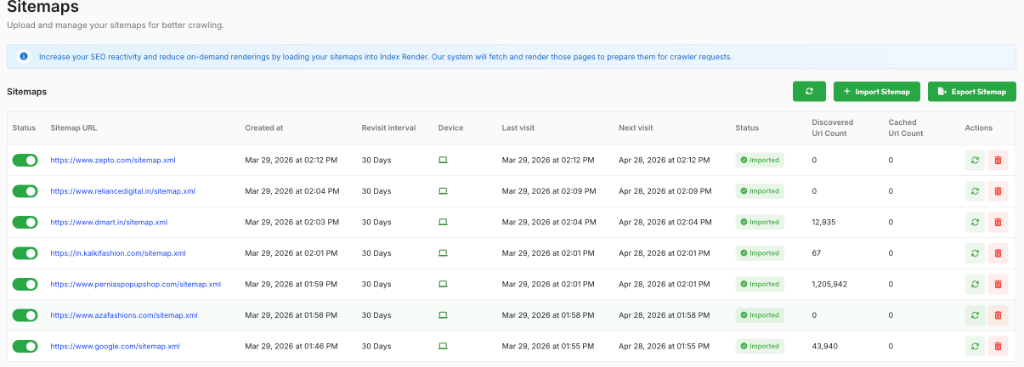
Key Features
Auto-Discovery of URLs
Instead of manually entering URLs, the Sitemap Manager automatically discovers and parses all links listed in the provided sitemap.xml file. It populates the Discovered Url Count and systematically begins caching them to increase your Cached Url Count.
Activating/Deactivating URLs
Using the toggle switches in the Status column, you can quickly activate or deactivate an entire sitemap. Deactivating a sitemap pauses automatic syncing and caching for all its associated URLs without permanently deleting the sitemap entry.
Revisiting and Recaching
Clicking the Recache (refresh icon) button in the Actions column manually triggers a re-fetch and render of the sitemap.
Deleting Sitemaps
You can remove a sitemap completely by clicking the Trash icon in the Actions column. This action will delete the sitemap entry and clean up the related cached URLs from our system.
Importing a Sitemap
To add a newly generated sitemap to the system:
- Click the Import Sitemap button above the table.
- Enter the full Sitemap URL (e.g.,
https://example.com/sitemap.xml).
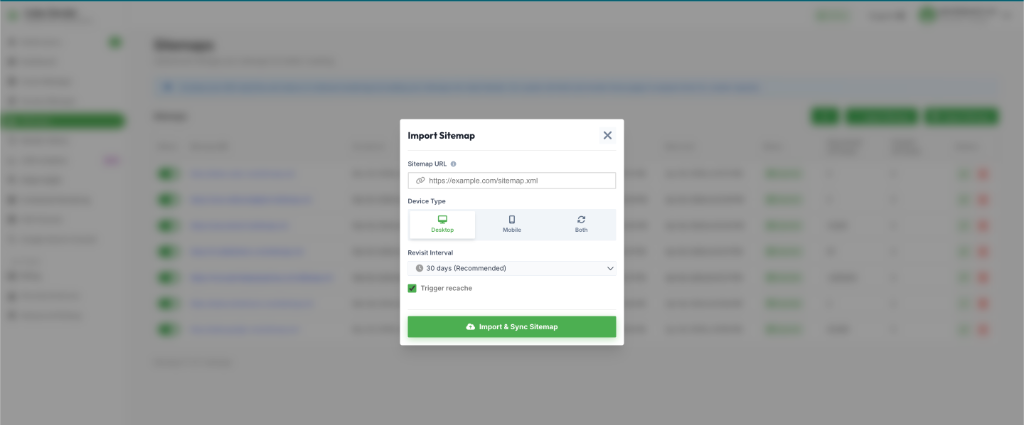
During the import process, you can leverage several production-grade features:
- Device-Specific Fetching: Choose the primary target audience—cache the Desktop version, Mobile version, or Both.
- Automated Syncing (Revisit Interval): Define how often the system should revisit the sitemap to update changes (e.g., 30 Days Recommended).
- Immediate Recache Triggers: Leave the "Trigger recache" box checked to force an immediate update upon importing.