Pages That Have Not Been Requested in the Past 30 Days
Identify and manage stale URLs that haven't been visited by bots in the last 30 days.
Summary / Overview
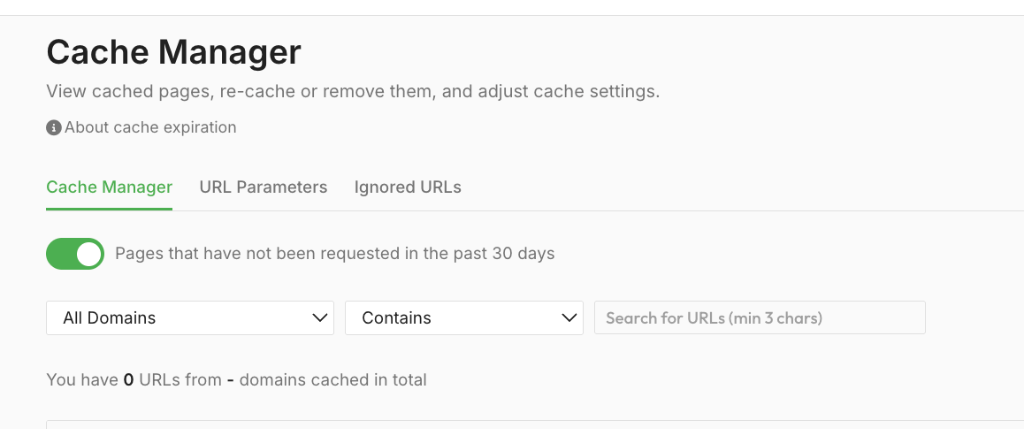
Index render’s “Pages that have not been requested in the past 30 days” view helps you quickly locate stale content that hasn't been accessed by crawlers recently. This feature is available in the Cache Manager and helps teams clean up old content, optimize cache usage, and prioritize high-value pages for recaching or retention.
Detailed Explanation / How It Works
What It Does
When enabled, this toggle view filters your cached page list to only show URLs that have not been requested by search engine bots (such as Googlebot or Bingbot) in the past 30 days.
These are considered stale pages. A stale page is a URL that exists in your cache but is no longer actively crawled or discovered by search engines. This typically happens when a page is removed from your site's navigation, dropped from your sitemaps, or superseded by newer content. By identifying these stale pages, you can make informed decisions about cache cleanup or deprioritization, ensuring your rendering limits are spent on high-value, active content.
Why It Matters
- Provides insight into which pages are no longer being crawled.
- Helps identify forgotten or deprecated URLs still living in cache.
- Allows teams to focus recache or crawl efforts on pages that are more SEO-relevant.
Step-by-Step Usage
Common Pitfalls / Tips
- Some inactive pages may still be important for seasonal or campaign-based SEO—review URLs before purging.
- Use this view together with Rendering Queues to evaluate content freshness strategies.
- Combine bot traffic insights with your analytics platform to get a full picture of page performance.